Build an AI website in 60 seconds
AI generates your personalized website instantly with built-in scheduling, payments, email marketing, and more.
Start for free


AI landing page generator: a practical guide for first-time founders


When you publish landing pages, speed is everything, especially for a first-time founder. That’s why you want something live now, not after days or weeks of tinkering. Plus, they should be clear and optimized for conversion to attract potential clients and capture leads.
This is when AI landing page generators become your best option. These AI-powered tools are designed to do the heavy lifting, allowing you to focus on what's important.
The best part of an AI landing page generator? There’s no need to worry about not having the technical skills to create a lead generation website. And gone also are the days when you stare at blank screens for a long time, thinking of something to write about your website.
This guide walks through how founders can create a landing page with artificial intelligence in record time, maintain full control, and appear credible to potential customers and search engines.
What a first-time founder’s landing page must do (and not do)
For a first-time founder, knowing what to do on your new landing page helps you save time and effort, especially if you aim to go live fast.
Here are 4 tips to consider:
1. One primary goal (email capture, demo request, preorder)
Every new landing page needs a single job. Whether it’s collecting emails, booking demos, or securing preorders through capture forms, everything on the page should point to that action.
That’s why when founders try to make a page do five things at once, nothing converts. A focused goal makes even simple landing page templates feel intentional.
2. Message clarity over features
A strong landing page design explains who your target audience is and what problem it solves before the listing features. Visitors don’t need a full roadmap; they only need to know if this is a fit for them. You get better results with your AI landing page once you strip back the fluff and sharpen the message.
3. Social proof + risk reversal
A professional landing page builds trust quickly. Short testimonials, client logos, or usage stats reassure visitors that you have experience in your industry and have experience in working with past clients.
Pair that with a risk-reversal strategy, such as a free trial or a money-back guarantee, to minimize the hesitation from potential customers. These trust signals work well with AI-generated copy because they add human weight.
4. Avoid: too many CTAs, vague promises, no “who it’s for”
This is where founders stumble. Multiple calls-to-action (CTAs) compete for attention, while vague promises feel empty. And pages that never define the target audience leave visitors guessing.
Keep one clear action, be specific, and say who the page is meant for. When you create landing pages, restraint matters more than extra AI features or flashy design tools.
Step-by-step: build a landing page with an AI generator
Learn how to create a landing page with an AI landing page generator using these 7 quick steps:
Step 1: Define ICP + one pain + one outcome
Before you draft your AI landing page, get clear on who you’re building it for. Start by defining your target audience through an Ideal Customer Profile (ICP), then identify one sharp pain they deal with daily and one outcome they actually want.
Step 2: Draft your offer + CTA
Next, draft your offer with clarity in mind, stripping away any ambiguity. Whether you’re offering a checklist, demo, early access, or a paid pilot, one thing should be certain: it has to be concrete.
Pair this with a call to action that matches the intent, such as “Start your free trial now” or “Get early access.” This step sets the direction for your website copy and where to place the CTAs across the landing page.
Step 3: Generate the first draft with AI
Now, share your inputs into the AI landing page generator in the form of a prompt, and within seconds, it can create new landing pages. The way this works is that the AI analyzes your prompt using natural language processing to understand your intent.
AI website generators like B12 can build landing pages using AI prompts, resulting in a professional landing page that can go live fast.
Step 4: Edit for specificity (numbers, timeframe, proof)
Use words that convey a sense of specificity about your business, including the number of clients you have helped, the timeframe involved, and proof of outcome. This builds credibility and trust, which in turn helps increase conversions.
Avoid using vague and generic phrases like “fast setup” or “supported many clients.” For instance, if you run a service-based business like a bookkeeping firm, you might say, “Helped 200+ small businesses reduce monthly reporting time by 40% in the first 30 days.”
Step 5: Add trust (FAQ, testimonials, logos, security)
Adding a few trust elements to your landing page can ease doubts and help visitors feel more comfortable. A short FAQ can handle common objections, real testimonials show you’re legit, recognizable logos add instant credibility, and security cues like SSL badges reassure people their info is safe.
Visitors want reassurance they’re not engaging in something sketchy. You don’t need to pile everything on your landing page; covering the basics is enough.
Step 6: Add conversion tools (form, calendar, payments if relevant)
To convert potential customers, a landing page should include the right tools. Add capture forms, booking calendars, or payment buttons, if relevant. Make sure these are connected to your email marketing platforms, so follow-ups occur automatically.
Step 7: Publish + measure
Once your professional landing page feels ready, hit publish – either on your own domain or a free domain. Platforms like B12’s AI website builder make this fast with one-click workflows.
You can also connect your page to Google Analytics or other tools to see how people interact with your new landing page. This allows you to improve your page without starting from scratch, while collecting leads in record time and growing your target audience.
A founder-friendly prompt template (copy/paste)
A good prompt shapes everything the AI writes.
Here’s a prompt template, along with some examples that first-time founders can reuse when creating landing pages:
- Prompt template
“Create a landing page for [product or service]. The target audience is [ICP]. Their main pain is [pain]. The outcome they want is [result]. Our differentiator is [why us]. CTA: [action]. Tone: clear, friendly, credible.”
- Prompt example for SaaS founder
“Create a startup landing page builder page for a B2B SaaS that helps agencies manage client intake. Target audience: small agencies. Pain: messy onboarding. Outcome: faster setup. Differentiator: built-in forms and automation. CTA: Book a demo.”
- Prompt example for service business
“Create a professional landing page for a bookkeeping service. Audience: freelancers. Pain: time lost on finances. Outcome: peace of mind. Differentiator: flat monthly pricing. CTA: Get a quote.”
- Prompt example for creator or newsletter
“Create a page for a weekly newsletter. Audience: early founders. Pain: scattered advice. Outcome: clear guidance. Differentiator: real-world examples. CTA: Subscribe free.”
9 conversion audits to run before you share the link
To boost conversions on your landing page, it’s essential to run some conversion audits. Here are 9 steps to follow before you start sharing your landing page link:
1. Above the fold
Show your main benefit or outcome right at the top so visitors see it immediately. This helps them know why your page matters without scrolling.
2. CTA copy
Your call-to-action should tell people exactly what to do, like “Start your free trial” or “Book a demo.” Make it simple and tied to the result they’ll get.
3. Form friction
Ask only for the information you really need, like name and email. Too many fields can make visitors give up before signing up.
4. Mobile devices
Check that your landing page looks good and works on any screen, from phones to tablets. Most visitors will leave if it’s hard to use on mobile.
5. Speed
Your page should load fast, even if someone has a slow internet connection. Slow pages frustrate people and hurt conversion rates.
6. Proof density
Show trust signals like real testimonials or recognizable logos, but don’t crowd the page. A few well-placed examples go further than a wall of text.
7. Pricing clarity
Make your pricing clear and upfront so visitors aren’t surprised later. People trust pages that are honest about costs.
8. Objections
Use FAQs to answer the most common questions or concerns visitors might have. This helps reduce hesitation and makes people feel more confident.
9. SEO basics
Add clear meta tags, readable headers, and a structure that search engines can crawl. This helps your landing page get found by the target audience you want.
Common AI landing page mistakes (and fixes)
Even with the best AI landing page generator, it’s easy to make mistakes that hurt conversions. Here are some common slip-ups and how to fix them so your page actually works for your target audience.
1. Generic copy
Landing pages sometimes feel like everyone else’s because the text is too broad or boring. Make it yours by adding specific details, examples, and a voice that matches your brand.
2. No “why trust us”
Visitors want to know they can rely on you. Add simple trust signals like frequently asked questions (FAQs), real testimonials, logos, or security badges so people feel safe taking action.
3. Design-first, no story
Some founders focus on making things look pretty before explaining what their product really does. Start with your message first, then use design elements to support it, not replace it.
4. No tracking or follow-up
If you don’t track what’s happening on your page, you’re guessing what works. Connect your landing page to Google Analytics or built-in reporting, and make sure follow-ups like emails happen automatically.
How B12 helps founders launch faster (without sacrificing quality)
B12 understands the pains founders undergo when launching a landing page for the first time. That’s why B12’s platform is designed for first-time founders who want to publish quality pages.
Here’s how B12 provides the assistance you need:
1. AI-generated draft with editable sections
B12 gives you a full landing page or website draft right away, so you’re not starting from zero. You can either feed your prompt on B12’s homepage or choose a landing page template from its website prompt gallery or industry library.
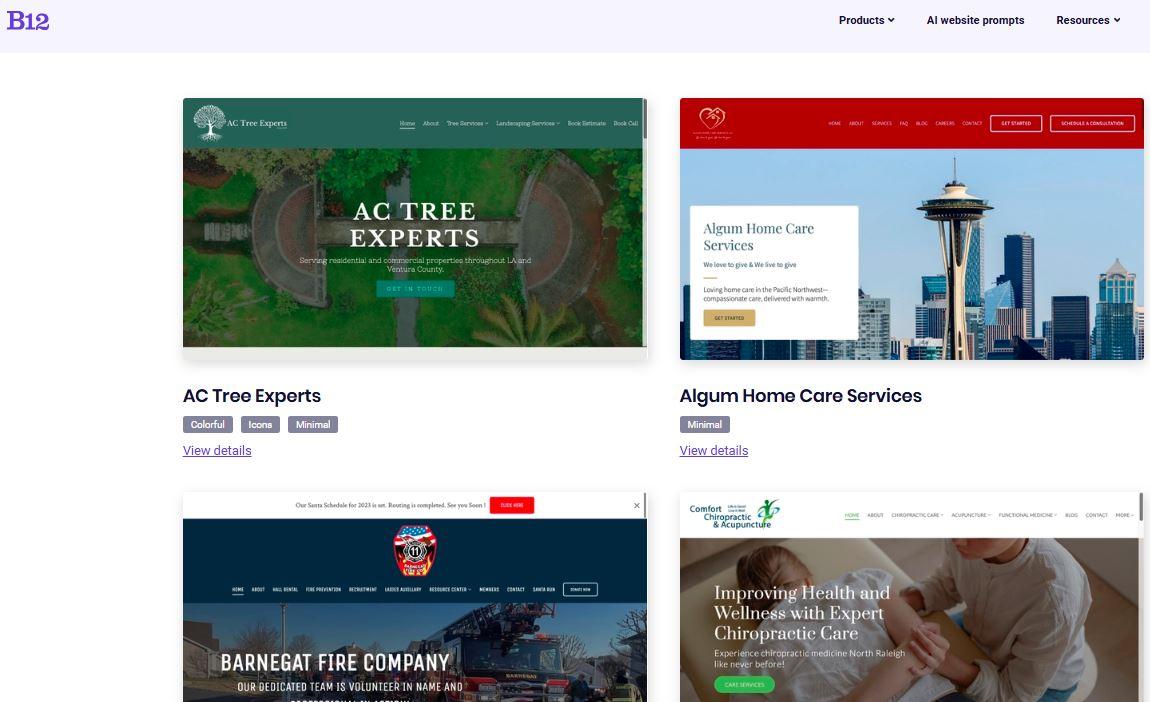
Once you get your landing page draft, you can easily edit any section using its editor or AI Agent to match your message without breaking the layout.
2. Built-in forms, scheduling, payments, and hosting
Everything you need to launch is already included in your page. From intake forms and scheduling tools to payments, hosting, and SSL, they’re all built into your AI-generated landing page. This means less setup work and fewer tools to connect before you go live.
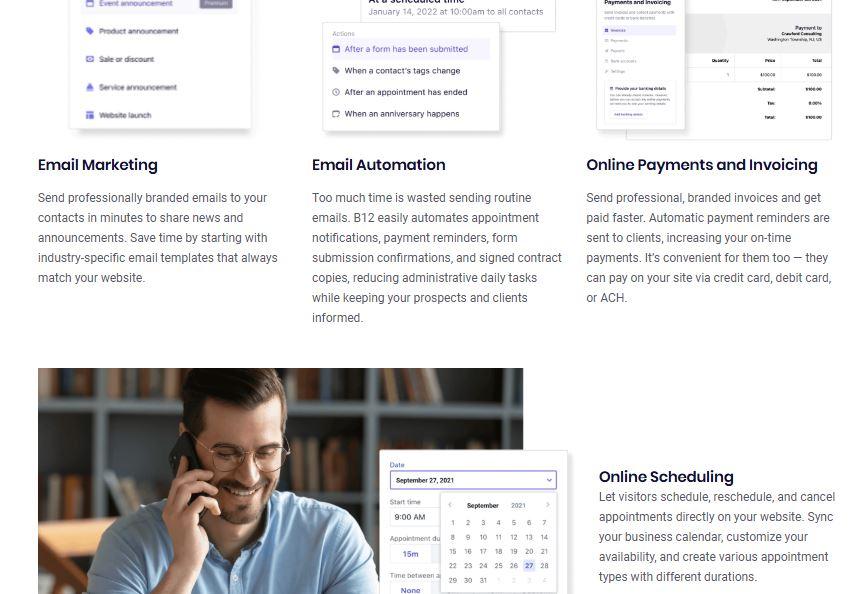
3. Optional human help for extra polish
If you want your page to look and sound even better, real experts can step in to fine-tune your copy and design. B12 offers the creative services of its copywriters and designers, allowing you to enhance your page while ensuring it’s still aligned with your tone and brand identity.
This setup ensures that while you still have full control of the editing process, you can also access professional support when needed.
Create high-converting landing pages with B12’s AI landing page generator
Building a landing page doesn’t have to be complicated or stressful. The key is staying focused on one clear goal, one audience, and one problem you’re solving.
With an AI landing page generator, you can quickly turn an idea into a real page without needing tech skills. Tools like B12 make it easier to write content, add forms, and launch fast.
Once your page is live, the work doesn’t stop there. Tracking results helps you see what’s working and what needs fixing. Testing small changes over time can lead to more sign-ups and better results. The faster you publish and learn, the faster your landing page starts bringing in real leads.
Generate your landing page with B12 and launch faster using built-in tools, smart AI help, and an editor that makes changes easy – no coding skills needed!
Look professional online with tips from B12
Receive our email newsletter for advice on how to grow your business and engage clients.
Draft your site in 60 seconds
Get an AI website made specifically for you that's free to launch.
Start for free ✨No credit card required
Related posts


Spend less time on your website and more time growing your business
Let B12 set up your professional online presence with everything you need to attract, win, and serve clients.