Salon website builder with online booking
B12 is a salon website builder you use by chatting with AI. Describe your salon and get a site with your services, gallery, and online booking. Launch it free, then update it anytime just by asking.
Free to try. No credit card needed.
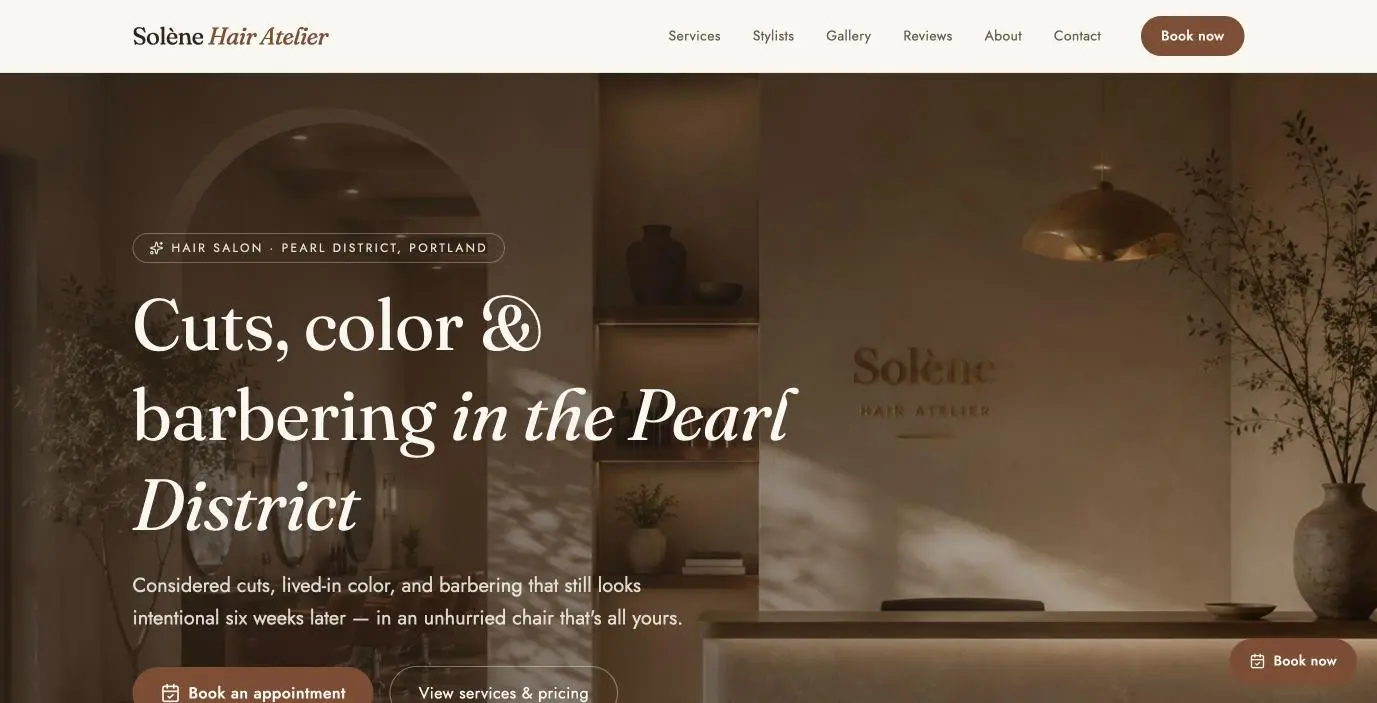
Prompt
"A warm, editorial site for my hair salon in Portland."
What a salon website needs
People checking out your salon want to see your work, know your prices, and book without calling.
- A gallery of your work. Recent cuts, color, nail designs, and brow treatments. Update it as you take on new clients.
- A service menu. Your services, appointment lengths, and starting price.
- Online booking. Clients pick a service, stylist, and time. Give them the option to pay a deposit if needed.
- Stylist profiles. Photos, specialties, and individual booking links.
- Policies. Cancellation, late arrivals, and deposit rules. Add prep instructions for appointments that need them.
- Location and hours. Your address, hours, phone number, and parking information. Link to your Google Business Profile.
- Reviews. A few short quotes from real clients, near the book button.
How to build a salon website with B12
- 1
Describe your salon to the AI Agent
Tell it your salon’s name, location, services, and anything else you want on the site.
Try prompts like these:
- "Build a site for Fern & Fade, a hair salon in Portland. Add a service menu with prices and times."
- "Add a booking page where clients choose a stylist and pay a $20 deposit."
- "Add a profile page for each stylist with their specialties and a book button."
- "Put our hours, a map, and parking info on the contact page."
- "Add a policies section with our 24-hour cancellation rule."
- 2
Upload photos and references
Once your first draft is ready, upload 10 to 20 photos of your best work, your logo if you have one, and your current service menu. A price list on paper or a screenshot of your booking app works, too. Have a salon website you like? Upload a screenshot so the AI Agent can use it as a design reference. Then ask for changes until it feels like your salon.
- 3
Set up booking and deposits
Ask the AI Agent to add a booking page to your website. Tell it which services clients can book online, how long each appointment takes, and whether you require a deposit. If you already use Calendly or another booking tool, you can connect it instead of switching.
- 4
Edit anything, any time
Keep chatting to update your prices, change a photo, or add a new service. You can also click on a section in the visual editor and ask for changes there. No coding or designer needed.
- 5
Launch and get found
Publish for free on a b12sites.com address, or connect your own domain on a paid plan. Then share your website link on Instagram, your Google Business Profile, and in booking confirmations.
Salon website builder features that fill your chair
Online booking and deposits
Clients can book at 11 p.m. on a Sunday if that’s when they think of it. Ask for a deposit upfront so last-minute cancellations cost you less. See how online booking works on B12.
Payments and products
Take deposits at booking and sell retail products like shampoo and styling cream. Just ask the Agent to add checkout.
Client intake
Ask new clients about allergies, previous hair treatments, and other details before they arrive. You can collect everything through B12’s client intake forms, included on the Website + Client Engagement plan.
Email marketing
Send clients updates about open slots, seasonal offers, and rebooking reminders, also on Website + Client Engagement.
Stylist pages and service pages
Give each stylist and each main service its own page. That way, clients searching for "balayage near me" or "gel manicure" land on a page about exactly that, with prices and a book button.
Get your salon found in local search
When someone searches for a salon nearby, Google considers three main things: how closely your business matches the search, how far away it is, and how well-known it is. It also says that complete and accurate info, along with more reviews and positive ratings, can help businesses appear in local search results.
- Set up your Google Business Profile. Add your hours, services, photos, and a link to your booking page.
- Ask for reviews. Send a short request after each appointment, and reply to the reviews you get.
- Keep your details the same everywhere. Use the same name, address, and phone number on your site, profile, and social accounts.
- Name your services the way clients search. Stick to terms people recognize, like "balayage," "men's fade," and "lash lift."
- Mention your neighborhood. Put your city and area on your home and contact pages.
How much does a salon website cost?
It depends on who builds it. According to Project Cost Estimator (updated July 2026, based on 600+ quotes), a freelancer charges about $2,900 to $8,700 for a salon website, an agency about $6,950 to $21,750, and ongoing hosting, tools, and maintenance run about $40 to $300 a month.
With an AI website builder, you do the setup yourself and pay a monthly plan instead. With B12, you can start for free and upgrade later when you want your own domain.
Salon website templates
Want a head start on your salon website? Pick a B12 template you like. Each one comes with the prompt that built it, so you can remix it with your own name, photos, and services.
A few to start from:
Plans for salon websites
-
Free
Build and launch your salon site on a b12sites.com address.
-
Website
Your own domain, more AI credits, and analytics.
-
Website + Client Engagement
Adds client intake, email marketing, contracts, and a contact manager.
See current prices on the pricing page.
B12 or salon software?
B12 is a good fit if you want a site where clients can see your work, book, and pay online, and you can change it yourself anytime. If you need complete salon management, like inventory, payroll, and in-store point of sale, a dedicated salon platform will cover more of that. You can use one for the front desk and B12 for the website, and connect the booking tool you already use.
Tips for a salon website that gets booked
- Lead with your best photo. Real work from your chairs beats any stock photo.
- Show prices. "Starting at" prices cut down on calls and help clients pick a service.
- Put the book button everywhere. At the top of the page, under each service, and on each stylist page.
- Keep the gallery fresh. Add new work every few weeks, so returning visitors see something new.
- Write your policies once. Clear cancellation and deposit rules, so clients know what to expect before they book.
FAQ
Yes. You can build and launch a salon site on B12 for free on a b12sites.com address. You’ll need a paid plan for your own domain.
Yes. Ask the AI Agent for a booking page with a deposit at checkout, and it adds one to your site.
Yes. You can connect tools like Calendly, or ask the AI Agent to add anything with an API.
Hiring a freelancer runs about $2,900 to $8,700 and an agency about $6,950 to $21,750, per Project Cost Estimator. With a builder like B12, you can start free and pay a monthly plan when you need more.
A home page, services and prices, a gallery, stylist profiles, booking, policies, and a contact page with your hours and map.
Set up a free Google Business Profile, and link it to your website and booking page. Ask happy clients to leave reviews, too. Google says complete info and more reviews can help your local ranking.
No. You describe what you want in chat. You can also click on any part of the page and ask for a change there.
Build your salon website
Describe your salon and get a site with booking you can launch for free.